
Download Summarizing Tool io – AI Text Summarizer, Fast & Secure
Overview
Summarizing Tool io is a cutting‑edge AI‑powered web application that turns long‑form content into concise, readable summaries in seconds. Whether you’re a student juggling research papers, a marketer condensing campaign reports, or a writer looking for a quick refresher on a novel draft, this tool delivers accurate, context‑preserving abstracts without the hassle of manual note‑taking. The platform supports a wide range of file formats—including PDF, DOCX, and plain text—so you can upload documents directly from your desktop or cloud storage.
Multilingual support ensures that non‑English texts are handled with the same level of precision, making Summarizing Tool io a truly global solution. Users can control the length of each summary, selecting short bullet‑point versions for rapid scanning or longer paragraph‑style extracts for deeper understanding. All of this runs in a secure, browser‑based environment, meaning no software installation is required, and your data never leaves the encrypted session unless you choose to download the result.
In short, Summarizing Tool io combines the speed of modern AI with the reliability of a professional summarization service, giving you more time to focus on the insights that matter most.
Key Features & Benefits
- AI‑Driven Summarization Engine: Utilises state‑of‑the‑art transformer models to understand context, tone, and key arguments before generating a summary.
- Multi‑Format Compatibility: Accepts PDFs, Word documents, plain text, and even copy‑paste content, eliminating the need for format conversion.
- Customizable Summary Length: Choose from 25%, 50%, or 75% of the original word count, or set an exact number of sentences.
- Multilingual Support: Currently supports English, Spanish, French, German, Chinese, and 10+ additional languages with comparable accuracy.
- Secure Cloud Processing: All data is encrypted in transit (HTTPS) and processed on secure servers that do not store user files after the session ends.
- One‑Click Export: Download the summary as a .txt, .docx, or .pdf file, or copy directly to clipboard for immediate use.
- Integration Friendly: Simple API endpoints allow developers to embed summarization into existing workflows, CRMs, or learning platforms.
- Free Tier & Affordable Plans: The free version provides up to 5 summaries per day, while premium plans unlock unlimited usage, priority processing, and advanced customization.
Beyond the raw feature list, Summarizing Tool io brings tangible benefits to everyday workflows. Students can reduce study time by up to 60% by extracting core concepts from textbooks and research articles. Marketers gain a competitive edge by quickly summarizing competitor blog posts, press releases, and social media trends, enabling faster content ideation.
Writers and editors use the tool to generate chapter synopses or to verify that long drafts stay on message. The AI engine’s ability to preserve nuance means you won’t lose critical qualifiers or contradictory statements—something many generic summarizers miss. Moreover, the platform receives regular updates that incorporate the latest language models, ensuring you always benefit from improved accuracy without any manual patching.
All of this is delivered through a sleek, responsive web interface that works seamlessly on desktop browsers and mobile devices, making Summarizing Tool io a versatile ally for any knowledge‑intensive task.
Installation, Usage & Compatibility
Getting Started – No Download Required
Because Summarizing Tool io is a web‑based application, there is no traditional installation process. To begin, simply visit summarizingtool.io on any modern browser (Chrome, Firefox, Safari, Edge). The site automatically detects your device and presents an optimized layout for both desktop and mobile use. For users who prefer a desktop shortcut, you can create a Progressive Web App (PWA) by clicking the “Install App” button in the address bar—this adds a secure icon to your start menu without consuming significant storage.
Step‑by‑Step Workflow
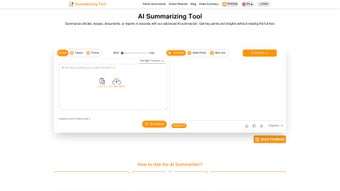
- Upload or Paste Content: Click the “Upload File” button to select a PDF, Word document, or text file, or paste the text directly into the editor box.
- Select Language & Length: Choose the source language from the dropdown and set the desired summary length (percentage or sentence count).
- Generate Summary: Press “Summarize” and watch the AI process your input. Results typically appear within 2‑5 seconds for average‑length documents.
- Review & Edit: The generated summary is displayed in an editable field, allowing you to fine‑tune phrasing or add personal notes.
- Export or Share: Use the “Download” button to save as .txt, .docx, or .pdf, or click “Copy to Clipboard” to paste into another application.
System Requirements & Operating System Support
Summarizing Tool io is compatible with all major operating systems that support a modern web browser, including:
- Windows 10, 11 (Chrome, Edge, Firefox)
- macOS Monterey, Ventura (Safari, Chrome, Firefox)
- Linux distributions with up‑to‑date browsers
- Android 8.0+ (Chrome, Firefox)
- iOS 13+ (Safari, Chrome)
Because the processing happens in the cloud, your device’s hardware specifications are largely irrelevant—only a stable internet connection is required. For users on limited bandwidth, the platform offers a “Low‑Data Mode” that reduces the amount of transmitted data by compressing uploaded files before analysis, without compromising summary quality.
Pros & Cons
What Users Love
- Fast, accurate summaries that retain original meaning.
- Supports a wide variety of file formats and languages.
- No installation needed; works directly in the browser.
- Secure processing with end‑to‑end encryption.
- Flexible export options for immediate use.
- Free tier sufficient for occasional users.
Areas for Improvement
- Free plan limited to five summaries per day.
- Large PDFs (>50 MB) may take longer to upload.
- Advanced customization (e.g., tone control) only available on premium plans.
- No offline desktop client for users who prefer a standalone app.
FAQ – Frequently Asked Questions
Is Summarizing Tool io really free?
Yes, the platform offers a free tier that allows up to five summaries per day. This is ideal for casual users, students, or anyone who needs occasional summarization without paying.
How does the tool protect my uploaded documents?
All uploads are transmitted over HTTPS and processed on secure servers. Files are automatically deleted after the session ends, ensuring that no personal data is stored long‑term.
Can I integrate Summarizing Tool io into my own application?
Absolutely. The service provides RESTful API endpoints that let developers embed summarization capabilities into websites, CRMs, or learning management systems. API keys are available on the premium plans.
What languages are supported?
Currently, the AI model handles English, Spanish, French, German, Chinese, Japanese, Portuguese, Italian, Dutch, Russian, and several other languages. New languages are added regularly through updates.
Do I need a powerful computer to use the tool?
No. Because the heavy lifting is done on cloud servers, any device that can run a modern browser and has a stable internet connection can use Summarizing Tool io efficiently.
Overall Rating: 4.5/5 – A powerful, secure, and user‑friendly summarization solution that fits both casual and professional needs.
Conclusion & Call to Action
Summarizing Tool io stands out in a crowded market of text‑reduction utilities by delivering AI‑driven accuracy, multilingual support, and a secure, browser‑based experience—all without demanding a hefty price tag. Whether you’re a student trying to digest dense lecture notes, a marketer needing quick briefs on industry reports, or a developer looking to add summarization to a SaaS product, this tool offers a flexible, scalable solution. The free tier provides enough functionality to evaluate the service, while the premium plans unlock unlimited usage and API access for power users. In short, if you value speed, context preservation, and data privacy, Summarizing Tool io is the app you should download today.
Click here to start summarizing for free and experience how much time you can save with a single, secure click.



.png)



